EN

How a Modular Drawer Cabinet Organizes Small Hardware?
A drawer cabinet becomes useful for small hardware when it reflects the way people actually reach for parts. Loose screws, fittings, cutters, bits, clips, and fasteners may not take much room individually, yet they create repeated delays when they are mixed together or stored beyond reach. A modular drawer cabinet gives a team a physical system for sorting those items by task, size, frequency, and replenishment cycle rather than by whatever space happened to be empty.
For a workshop user, the practical question is not simply how many drawers a drawer cabinet has. It is whether each open drawer makes the next choice obvious. This is why a cabinet planned around access flow often feels easier to maintain than one planned around drawer count alone. The following method works as a decision framework; actual drawer dimensions, slide travel, load requirements, and module compatibility should be confirmed for the intended configuration.
Start with the work, then assign a drawer cabinet zone
Before filling a drawer cabinet, make a short inventory of the small hardware used around one bench, machine, repair cart, or assembly task. Separate fasteners from measuring items, replacement tips, electrical connectors, and infrequently used spares. Then mark how often each group is needed: every cycle, daily, weekly, or only for a particular repair. A drawer cabinet works as a map when its front positions hold the items that move through that map most often. A well-labeled drawer cabinet also makes the return location clear after each task.
Put daily-use groups in the drawers that are easiest to reach while standing at the work area. Reserve lower, higher, or rear locations for replenishment packs and less frequent parts. That modest distinction can reduce the temptation to place a handful of unrelated items into the nearest open drawer. It also gives a new user a clear starting point: choose the task zone first, then the labeled compartment.
Use adjustable partitions to create families, not random boxes
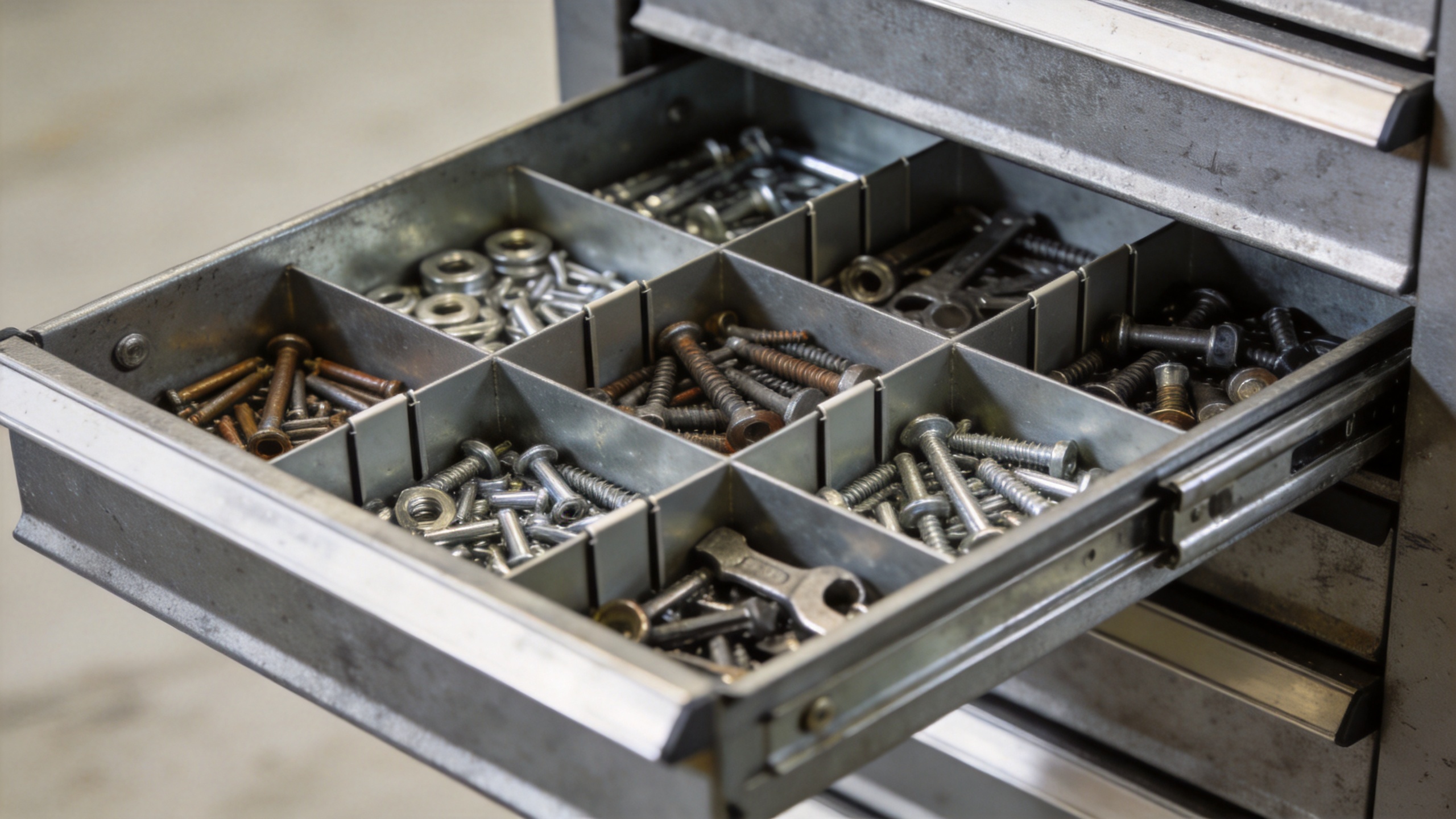
Adjustable partitions are valuable because small hardware rarely stays the same size mix for long. A drawer cabinet can begin with a few broad families—threaded fasteners, drill accessories, electrical parts, hand-tool consumables—and then use adjustable partitions to divide each family into practical subgroups. For example, one drawer may separate washers, nuts, and bolts by diameter; another may group driver bits, blades, and replacement tips by the tool that uses them.
The goal is not to create the maximum number of compartments. Too many tiny cells can make restocking slow and labels hard to read. Instead, size each compartment for one recognizable item family and leave enough room to pick an item without disturbing its neighbors. When inventory changes, adjustable partitions let the drawer cabinet change with it. Adjustable partitions also make it easier to test a revised grouping without replacing the whole insert. Move a divider, update a label, and record the new location before the old grouping becomes a habit.
- Group parts that are selected together during the same task.
- Separate similar-looking items that have different sizes or functions.
- Keep a small overflow area for unopened packs, not for unidentified leftovers.
- Use a label that states the part family and, where useful, the size range.
Why full extension slides matter for small hardware
Small components stored at the rear are easy to forget when a drawer only opens partway. A drawer cabinet fitted with full extension slides, where that configuration is specified, can make the rear portion visible and easier to reach. That supports an important organization rule: a part cannot be managed reliably if users cannot see where it belongs. Full extension slides do not define the whole system, but they make the system easier to inspect during picking and restocking. For deeper sections, full extension slides can make a rear compartment part of the normal visual check.
When evaluating a drawer cabinet, ask which drawers need this access most. Deep drawers holding several partitioned rows usually benefit more than shallow drawers with one row of frequently used items. Also ask for current confirmation of slide travel, drawer clearance, intended load, and any locking arrangement. Those details are configuration-specific; they should be documented rather than inferred from a general cabinet description.
Build a modular drawer cabinet in layers
A modular drawer cabinet is easier to understand when each layer has a job. That layered drawer cabinet plan keeps active parts distinct from reserve stock. The first layer is the active-use layer: small hardware required in the current shift or repeated task. The second is the support layer: related consumables, setup tools, and repair parts. The third is the reserve layer: unopened stock or slower-moving items. This layout keeps the drawer cabinet from becoming a single mixed archive.
Modularity is useful only when it follows a real workflow. A brand or procurement team considering a modular drawer cabinet can first list the tool groups, part sizes, access zones, and future changes that need accommodation. Then it can discuss which modules should sit together, which drawers need dividers, and what details need supplier confirmation. The company profile for Haiyang Libenli Metal & Technology Co., Ltd. describes sheet-metal processing, metal furniture, and customized solutions; these are relevant starting points for a configuration conversation, not proof of any unconfirmed cabinet feature.
Create a simple return-and-review routine
Organization holds when the drawer cabinet has a return routine. At the end of a task, users should return reusable parts and tools to the visible label, move surplus material to the reserve location, and place unidentified items in one temporary review bin rather than across several drawers. A weekly check can identify empty compartments, mixed sizes, or labels that no longer match the contents.
Use the review to revise the drawer cabinet around evidence from use. If one compartment is constantly overfilled, it may need a larger section. If a rarely used part takes a prime location, move it to the support or reserve layer. If two parts are repeatedly selected together, test whether they belong in adjacent compartments. This is more useful than treating the original layout as permanent.
A practical setup checklist
- Inventory the small hardware and identify the task or user zone for each group.
- Assign the most frequent items to the most reachable drawer cabinet positions.
- Install adjustable partitions around item families, with room for picking and restocking.
- Specify full extension slides for drawers where rear access is important, subject to configuration confirmation.
- Label drawer fronts and internal sections using the same naming convention.
- Set a review date so the modular drawer cabinet can follow changes in tools, users, or stock.
Turn organization needs into a clear cabinet brief
A drawer cabinet is not organized by metalwork alone; it is organized by decisions about access. Describe the hardware groups, drawer depths, preferred partitions, slide-access needs, labels, finish expectations, and packaging requirements in a written brief. For OEM or private-label projects, this helps separate branding inputs from functional storage requirements and gives every reviewer the same points to confirm.
The most useful modular drawer cabinet is therefore one that can be read at a glance, adjusted when the work changes, and reviewed against the actual return routine. Start with the hardware and workflow, use adjustable partitions to make the groups visible, and choose full extension slides where rear access matters. The cabinet then supports a repeatable way to find, use, return, and reassess small parts.
 Hot News